melwyn.ai

melwyn Class

Learn to build with AI

Hands-on workshops that give your team real skills, not slides to forget.

who it's for

Built for the people who'll actually use it.

We calibrate every session to the room. These are the teams that get the most out of it, but if you build with AI for real work, you belong at the bench.

Operations Leader

Automate the overhead. Ship more signal.

Operations leaders know exactly where the manual work hides. This workshop shows your team how to eliminate it with practical AI tools, not theoretical frameworks.

Technology Leader

Ship faster. Document better. Review smarter.

Technical leaders use this workshop to identify where AI agents can augment their team's workflow, from first commit to production. Hands-on, tool-agnostic, immediately applicable.

Founder & Executive

Build leverage, not headcount.

For founders who need to do more with a lean team. This workshop installs practical AI leverage across sales, marketing, and operations, in a single day.

People & HR Leader

People-first. AI-powered.

People leaders who attend leave with a clear map of which HR processes to automate first, and the hands-on skills to start the following week.

Finance Leader

More insight. Less reporting overhead.

This workshop shows finance leaders where AI can collapse reporting cycles and surface insights that spreadsheets alone can't provide, with real examples from FP&A and close.

the method

Five modules. One connected arc.

This isn't a tip list. Each module answers the question the last one raised, so your team connects the dots instead of collecting tricks. The model is ready. The skill is you.

01

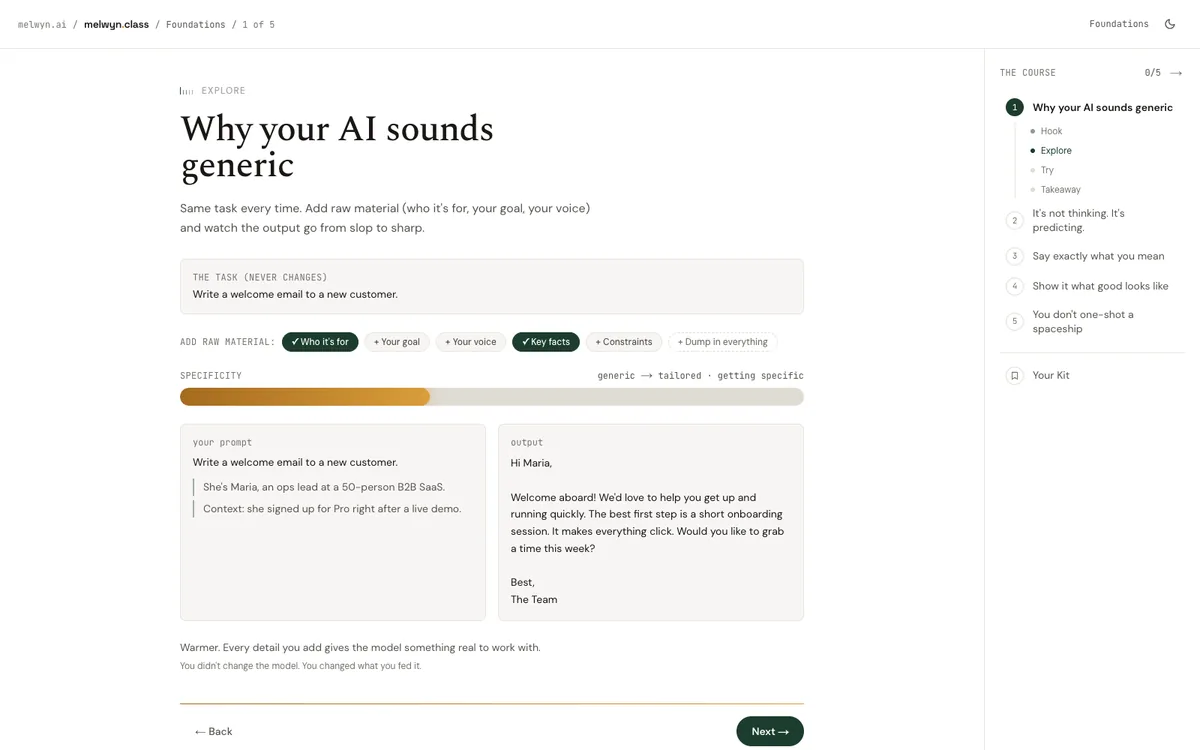
Why your AI sounds generic

Models used to be the bottleneck. Not anymore. If you're still getting slop, the gap isn't the model. It's that you gave it a generic, context-free prompt. Feed it the right raw material and the same model gives you something genuinely yours.

Nothing specific in, nothing specific out. Feed the model the raw material only you have.

02

It's not thinking. It's predicting.

The model doesn't know things. It predicts the next piece, one at a time, from what you gave it. That single fact explains everything: it's why context works, and it's why the model can be confidently, fluently wrong.

The model predicts; it doesn't know. Anywhere a wrong guess is expensive, make it show its work or admit it's unsure.

03

Say exactly what you mean

Vague in, vague out. A great instruction names the role, the task, the constraints, and what 'good' looks like. That's craft, not magic words.

Name the role, the task, the constraints, and what good looks like. Specifics aren't bossy. They're the job.

04

Show it what good looks like

Telling the model your standard is hard. Showing it is easy. One or two good examples beat a paragraph of description. The model copies the pattern.

When you can't describe your standard, show it. One sharp example beats a paragraph of adjectives.

05

You don't one-shot a spaceship

Nobody pours a finished thing in one go. You draft, critique, reheat, and assemble. The real skill is building a result in passes, and chaining the parts.

Draft, critique, refine, assemble. You build a great result in passes, never in one shot.

01

Pick the right surface

There isn't one Claude. There are four surfaces, each built for a different job: a chat to think and plan, an agent to get work done, a coding tool to build, and a design tool to prototype. Reach for the wrong one and even a great model feels clumsy.

Match the surface to the job: claude.ai to think, Cowork to get work done, Code to build, Design to prototype. Skills make them all smarter.

02

You don't slay the dragon on Day 1

A real system is too big to build in one move. The skill isn't doing it all at once, it's compartmentalizing: break the goal into systems, pick ONE, and build that first. Every wall starts with a single brick.

Compartmentalize the huge task. Pick one system, build it first, in dependency order, with the goal in mind.

03

Turn expertise into a Skill

A Skill is your expertise, packaged so Claude can pick it up on demand: a folder of instructions and resources that any surface can load. Write it once; every agent and chat gets smarter.

Package expertise as a portable Skill. The description is what makes it get discovered and loaded at the right moment.

04

Direct a team, don't do it all

One agent doing everything gets confused. The move is a team: an orchestrator that delegates to specialists, each with its own focused instructions and its own clean context. You direct; they execute.

An orchestrator directs specialists. Give each role its own instructions and isolated context so nothing bleeds together.

05

Connect it to the real world

A model that can't see your data is guessing. MCP is the standard plug that gives Claude reach: your analytics, your repo, your docs, your tools. Capability beats cleverness.

MCP gives Claude reach into real tools and data. When it's guessing, the fix is often a connection, not a cleverer prompt.

06

Build it to grow

Your first repo isn't the final one, but its bones decide whether it can grow. A scalable shape is simple: an orchestrator, specialist agents, and a shared layer of skills, knowledge, and templates they all draw from.

Orchestrator plus specialists plus a shared skills/knowledge/templates layer. Design the shape so the system can grow.

07

Ship v1, then evolve it

Building a real system takes weeks, not an afternoon. You ship a rough v1 with stubs and minimal agents, watch where it's weak, and grow it unevenly toward the parts that matter. Done is the start, not the end.

Ship a rough v1, observe, and improve in passes. Systems grow unevenly, and that's a feature, not a failure.

Where it leads

Start free. Go as deep as you want.

The Class is the same craft at every level. Learn it yourself, bring it to your team in a room, or have us build the system for you. One method, escalating depth.

01Free, self-serve

Learn it yourself

Work through the interactive Class on your own. Leave with a personalized take-home: your AI Operating Kit or your first System Blueprint, built from your own work.

02Live, for your team

Bring it to your team

The same method in a room with your people: hands-on, facilitated, tuned to your context. Everyone walks out with something they built and can use Monday.

03Done for you

Have us build it

When you'd rather buy the outcome than learn the craft, melwyn Lab builds and ships the automation for you, end to end.

Want to go deeper than the workshop, one on one or with a small group? Finish the free Class and raise your hand at the end. That is where the next level starts.

formats

Pick the depth that matches your team.

Half-day to full-day, beginner to advanced. Same hands-on method, scoped to where you're starting.

beginnerHalf day (3h) · max 20

Prompt Engineering for Teams

Write prompts that do what you actually mean.

  • Write prompts that work first time, not fifth
  • Build a team prompt library your colleagues can use immediately
  • Apply chain-of-thought and few-shot patterns without guessing
intermediateFull day (6h) · max 16

AI Workflow Automation

Build automations that actually run.

  • Build and deploy a working automation by end of day
  • Connect AI to the tools your team already uses
  • Write prompts designed for automation, not just chat
intermediateFull day (6h) · max 20

Applied AI Tooling

Know which AI to use, and how.

  • Evaluate any AI tool against a consistent framework
  • Make confident build-vs-buy decisions
  • Design integrations that survive model changes
How the workshop works

Format

Hands-on from the first hour

No death-by-PowerPoint. Every module is structured around a build task. Attendees leave with something that works.

Depth

Calibrated to your team

We run sessions at three levels: beginner, practitioner, and advanced. Pick the track that matches your team's starting point.

Retention

Prompt library included

Every attendee leaves with a personalised prompt library and a reference guide. Not a PDF they'll never open. A tool they'll use Monday.

Follow-up

30-day accountability check-in

We follow up 30 days after the session to review what landed, what didn't, and what questions emerged from using the skills for real.

Outcomes

What your team walks away with

  • 01Write prompts that work first time, not fifth
  • 02Build automations without writing code
  • 03Evaluate AI output with confidence
  • 04Identify the highest-value AI opportunities for your role
  • 05Build a team prompt and workflow library
Questions
Do attendees need any technical background?

No. The skill is in how you think and ask, not in writing code. We run beginner, practitioner, and advanced tracks and calibrate to your team's starting point.

On-site or remote?

Both. We run sessions in person at your office or live online, with the same hands-on format and same-day build either way.

How big can a session be?

We cap sessions to keep them hands-on (typically 16 to 20 people) so everyone leaves with something that runs, not just notes.

What do people actually walk away with?

A working build from the day, a personalised prompt and workflow library, a reference guide, and a 30-day check-in to make sure the skills stuck.